As with all what's going worldwide, i thought it was time to "clean up" as we just began Spring season. I already started to join the "Love M.E.G.S." blog with this one 2-3 days ago and now, i have uploaded two old simulators and 5 new ones...err...well, not so new since these were done in 2013!
First, the "Epoch Electrotennis/Entex Gameroom Tele-Pong" simulator:
And the "Marx T.V. Tennis" simulator:
And these never available until now (heck...7 years already! It was about time! LOL!!): Yonezawa Screen Tennis, Waco Blackjack, Waco Chuck-A-Luck, Waco Draw Poker and Waco Slot Machine.
There is no "text" to how to use the Waco handheld as the instructions are already built-in as you just need to press "F9" on how to uses these old electro-mechanical games simulators. And the best thing ?! No needs of batteries! ;p
In the last post (part 1), i left off with "How to (err...do) i colorize the vectors ?"
Well first, i have to tell that i am using the good old DVE emulator (DOS Vectrex Emulator), well 2 versions exactly (version 1.4 and 2.0) and some games & demos doesn't display correctly in DVE 1.4 (like Tsunami & Vix). But i wasn't the first to colorize Vectrex games as Walt Garey (told you i was going to talk about him in the last post) was the first one.
Walt made especially two overlays that colorize Spike Hoppin' and Star Trek:
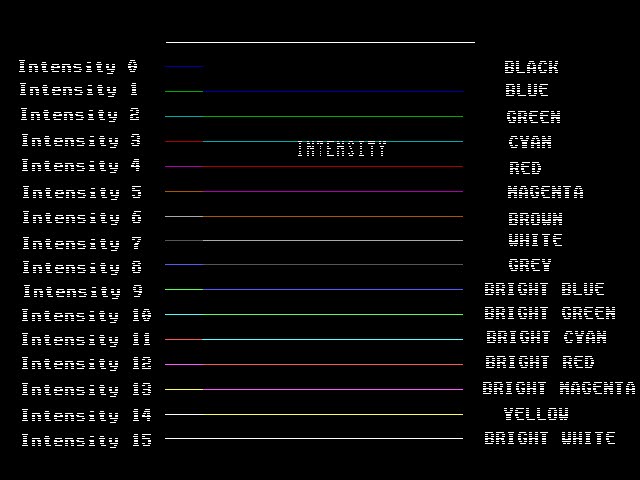
But these two overlay will colorize a specific color to a specific intensity, and because of these two overlays, i tried to do one myself but discovered that it was simple to add colors. So after choosing a specific color palette, i have chosen the MS-DOS color palette:
But i could have chosen the Amiga color palette:
Which is almost identical to the MS-DOS color palette (only brown is dark yellow on MS-DOS) and since the DVE is working in DOS so i settled for the MS-DOS color palette.
I have "hinted" in the first Vectrex video (Dark Tower in color) how i colorize the intensity, if you check the "Test rev.4" part, you would have seen this (not the same image):
So here you have it, by implying a specific color palette, each intensity programmed in a game (or demo) will show a specific color, say as an example: Spike is intensity 2, he will be Green and if he was in intensity 5, he will be in Magenta.
But you can choose which color will be shown in which intensity as i did for certain games like in this video (third Vectrex video):
In the video i have made 4 different color palettes, which are:
* Game & Watch style: Here i used the game Paratroopers and grey for intensity 0 (background) and black for intensity 1 to 15.
* Game Boy style: i used the game Star Hawk with the color light spinach as intensity 0 (background) and black for intensity 1 to 15.
* MSX style: Used the game Y.A.S.I. with blue background (intensity 0) and the rest of the MS-DOS color palette for intensity 1 to 15.
* Virtual Boy style: Again im using Y.A.S.I. but with black as background (intensity 0) and red for intensity 1 to 15.
So you can choose any of the millions of colors but only 16 maximum at a time.
Now did i have modded or hacked the DVE for putting colors ? NOPE! Not even 1 byte! Same as all the demos and games in ROM format, i left them as they are. The only thing i have changed was the BIOS to display "color arcade!" instead of "entertaining new ideas".
So how do i colorize the games ?!?! That....i'm letting you folks to figure it out until i released the files. I have kept that secret for the past 15 years and the only person who has a copy of these files (way back in 2009) was Daniel Bienvenu (yep...the guru programmer of Colecovision). I say "was" because now Daniel is now "Amy" (Hi Amy!).
So in the meanwhile, i'm waiting to see if any of you can figure out how to colorize the games. Graham Toal of the vector forums has an interesting idea how to colorize but his using "VecX - SDL" and a file called "colorize.diff". But i'm using DVE and NO extra files...
It's been quite a while since i've posted something but to begin this year, i'll talk about a subject that has been on so many minds for so many years: Color Vectrex Games!
But this subject isn't new, in fact, it's pretty old as it started with Smith Engineering when they tried to do a color Vectrex with two layers of phosphor on an ordinary b&w CRT, which to this day, is the only Vectrex color prototype found to this day (year 2020).
(both pictures from atarihq.com)
And here's some pictures taken from (err...lost the info, sorry!) the prototype above which you can see three different phosphor colors (red, white & yellow)
And this was way back in 1983! Also, Smith Engineering wanted to use a color CRT but this option was way to expensive. Already the Vectrex was retailed at $199 back in 1982, could you imagine how much it would have cost in color ?! Let's just say that it would have failed because of the high price.
So between 1984 and 1996, no new games were developed until John Dodzilla released, not one, but a few "hombrew" games for the Vectrex.
In the meantime, emulators has begun to pop-up (who remembers M.A.M.E v0.01 ?) and the only Vectrex emulator that existed in the late '90's was the DVE (Dos Vectrex Emulator) which the very first version to appear was version 1.0 by Keith Wilkins in (1996 or 1997? - err....damn i feel so old now...lol!)
And later in the new millennium, other Vectrex emulators began to show up (notable ones: ParaJVE and VecX) but that's another story as i will get back to the DVE...trust me, it's the star of this subject!
Now, in December 2017, a fellow by the name of Jason Kopp (aka Arcade Jason):
decided to hook-up a Vectrex on a color vector monitor, and the results were amazing!
But the problem is that the colors are variable depending which intensity is connected to which RGB color (Red/Green/Blue) and by connecting 2 out of the 3 RGB colors, you can obtain Cyan, Mauve or Yellow. What would be needed is a color circuit of the type used in old Pong consoles and determine which color does what.
Oh and BTW, the very first vector arcade to use colors was Tempest by Atari in 1981 (just an historical fact in case you didn't know).So now the craze of having a Vectrex playing in color has begun! But for me, it has been about 15 years that i've been playing some Vectrex games in color and i'm NOT bullshitting anyone. One of many project i worked on (i have too many!) is the one called the "VCA" project (Vectrex Color Arcade) which in the beginning i called it "Vector-X" project as i wanted to make a real Vectrex (bartop) arcade in color back then.
Here's a picture of my son playing Web Wars in color when he was 3 years old:
I've made two MOV files back then and those were not really good as i had a so %??% cheap video card. But now with technology that advancing so rapidly, i have taken two videos and put them on Youtube:
Oh crap...just saw that both videos have too much brightness! My fault! And here's some screenshots from the VCA:
Berzerk: only displays one color
Dark Tower: Displays many colors!!
Spinball: That one has 3 colors and i'm using hard
colors on top of the vectors.
Vectropolis 500: Hidden game with many colors.
Vectrace: only displays two colors.
Web Wars: This one too displays many colors!
Wormhole: Think John Dondzilla would shed a tear
or two to see so many of his games displaying
in colors.
Y.A.S.I.: Alex has outdone himself!
So, are you eager to play some Vectrex games in color ?! But you will have to wait (it's been about 15 years, can wait for 2-3 weeks ?!) as i want to explain how the %?%?%? i'm able to play in color before releasing anything.
Ok, so what is the "VCA" project ?
That project began with the DVE created by Keith Wilkins and updated by Chris Salomon (aka Malban), and a guy by the name of "Walt Garey"(i'll talk about Walt in the next part of the story). So long story short, i was able to display different colors on specific vectors and later on, since the space on each sides of overlays were blank, i started to it in good terms like in M.A.M.E using bezels, so now instead of using overlays to colorize, which i wasn't using anymore, i was making bezels for the DVE so that's how the VCA project was born.
You can see a few of these bezels (from Berzerk to Y.A.S.I.) and the best one i've ever made was the one for Y.A.S.I. as it took more than one month to draw pixel by pixel...No Joke! I started to draw these bezel pixel by pixel until i've figured a way to do these bezel way faster and simplier.
So the next question: How to i colorize the vectors ?
That my friends, will be told in the next part of this story and i left a "hint" in the first video (Dark Tower) so in the meantime, check out both videos and take care folks!
Three years ago (2016), i tried out the BMP Viewer tool by Hap and made two pictures demo in SCHIP mode: one called "Internet Janitor" and the other "Jughead" just to see if i've properly made both pictures in SCHIP.
For those who doesn't know what is the "Octo-Jam", it a jam which is held once a year between October 1st to October 31 (Halloween). This year, the "Octo-Jam 6" was held on itch.io at this URL: https://itch.io/jam/octojam-6
But this year, only 13 Chip-8, Super Chip8 and XO-Chip entries were submitted. Here's the list of each categories:
Chip-8: * Patrick's Chip-8 Challenge, by Tobias V. Langhoff * Mini Light Out, by by Tobias V. Langhoff * Golf, by buffi * Octojam 6 greeting, by Internet Janitor (aka John Earnest) * Falling, by versimilitude
Super Chip-8: * Rule 30, Improved, by versimilitude * The Rude Street, by System Logoff * Flutter By, by Tom Rintjema
XO-chip: * An Evening to Die for, by Internet Janitor (aka John Earnest) * Pizza Topping Panic!, by Tom Rintjema * Bustin (demo), by Tom Rintjema * Duel of the F8s, by Chromatophore * Dump Trump, by mwales (aka Michael Wales)
Ad if you're curious to know about XO-Chip, it was created by John Earnest. Go HERE to take a peek! ;)
Sadly, we can't play any Schip or XO-Chip games on the RCA Studio II...well maybe Schip games with hardware modifications, but ta least we have four new Chip-8 games (and one demo) that we can play on a Studio II with a slight (or no) mod and a Chip8 interpreter.
So if we add these 5 new Chip-8 games with the 165 (approx) games i already have in my database (and this not includes hacks or different sizes) which makes about 170 different Chip-8 games.... i think that Flip will need to make a a new multicart for all these Chip8 game one day.
On April 08, 2019, i posted this: (http://discreteconsoles.blogspot.com/2019/04/the-sharp-kjs-tv-game-xg-102.html) and i wrote that i didn't have this console...well it was true until last week as i finally brought one (ARGH...COULD....NOT....RESIST...BUYING.....IT!!!...LOL!!!), so now i have one but still don't know where to put it as this thing is quite huge: 19 5/8" x 15 3/4" x 7 1/4" and weights about 16 pounds...now that's a big console!
Here's a few pictures of this beast:
100 Yens a game, which is the equivalent of $1 USD
Player 2 paddle
The main panel
Player 1 paddle and reset button
Sounds get out by a speaker which is behind the paddle of Player 1
So after i have received it, took some pictures of it and began to open it to see what was inside this thing:
Side panel, which contain the mechanical coin counter
Coin slot and counter and at the bottom, the coin tray
Left side on the console
Top of the console
Err...still haven't translated what's on the sticker.
The back on the console
VHF and UHF connectors...you don't see those on newer TV's and consoles! But could this console be able to play in Europe as the frequency is 50 or 60 Hertz ? Hummm....
VHF outpout with Channel select; L-CH is Channel 1 and H-CH is Channel 2. And if you want to play this console in North America (Canada, United States and Mexico), you need to select Channel 95 to be able to play.
Sweet! Can plug a TV or monitor if you ever have both wall plugs used.
After removing the back panel: the inside of the console!
That is only the power supply and the RF modulator, oh and also the timer once you inserted a 100 Yens coin because you have 8 minutes and 20 seconds before the console shuts itself down.
The RF modulator
The timer circuit and power supply
The board of the main panel (with the game module removed)
The back of the coin counter
Now the fun begins! Here's the game module and the dedicated chips it uses:
Front of the Game Module - And as you can see, on all the dedicated game chips, you have right after the General Instrument logo (GI), the year and month when a chip was fabricated so they all start with "78" which means 1978. So this console was either released by the end of 1978 or in the beginning of 1979.
Back of the Game Module
The AY-3-8610-1 dedicated game chip (or PC-501 - Supersportic)
The Football/Soccer game from the 8610 (Sports - Game 1)
The Basketball game from the 8610 (Sports - Game 2)
The AY-3-8606-1 dedicated game chip 9 (or PC-506 - Wipeout)
The "Break-In 1" game from the 8606 (Block - Game 1)
The "Break-In 2" game from the 8606 (Block - Game 2)
The AY-3-8603-1 dedicated game chip (or PC-504 - Grand Prix/Race Car)
The game for 1 player (Car Race - Game 1)
The game for 2 players (Car Race - Game 2)
And the AY-3-8615 Color Converter
So this makes a total of 6 games (not 5 like previously mentioned). But what is strange is that all the games have the same colors. The only game which has the right colors is the Car Race games as they are the same color displayed on a Bandai TV-Jack Add-On 5000, the rest uses different colors which are provided by the AY-3-8615. That will be another story for another time.
And finally (for today), here's a picture of how i hooked up the console with Video & Audio output:
For Audio, i just hook it up on one the the speaker terminals (which i usually never do this but the audio source on the game module is very weak) and for the video, just plug in in the video output of the game module, easy as pie!
And here's a video recorded with an Adesso AV-200 USB gizmo:
The colors are very bright and we see thin static lines, this is what is outputted on the video output of the game module. Next time, i'll go right to the video source (the AY-3-8615 pin #5)